INT8 Post-Training Quantization Without Tears: A Production Checklist
INT8 PTQ in prod is a workflow, not a switch. The six steps we run before any model ships at reduced precision.
Handing a checkpoint to torchao.quantize_ or feeding it through TensorRT feels like a quick performance win. Memory drops by 50-75%, and the first benchmark numbers look great.
Then production traffic hits.
You start seeing silent quality degradation on long-context prompts, latency spikes under high-concurrency batching, or, worst of all, no speedup whatsoever, because the engine quietly fell back to FP16 kernels for half your GEMMs.
In enterprise ML infrastructure, INT8 post-training quantization is not an off-by-default compiler toggle; it is a systematic engineering workflow. Taking a high-capacity model (a vision backbone, a cross-encoder, an LLM) down to 8-bit without losing output fidelity or missing SLA targets means understanding your execution engine, your activation statistics, your kernel dispatch, and your runtime failure modes.
This is a checklist for post-training quantization specifically. Quantization-aware training is a different discipline with different economics, and it is out of scope here.
Here are the six steps we run before shipping any INT8 PTQ model to production.
Step 1: Profile Execution Engines and Map Runtime Targets
Before quantizing a single weight, map your target execution engine (TensorRT, vLLM, ONNX Runtime, or PyTorch 2 Export via TorchAO) and determine whether your workload is memory-bandwidth bound or compute bound. This one classification drives every decision that follows.
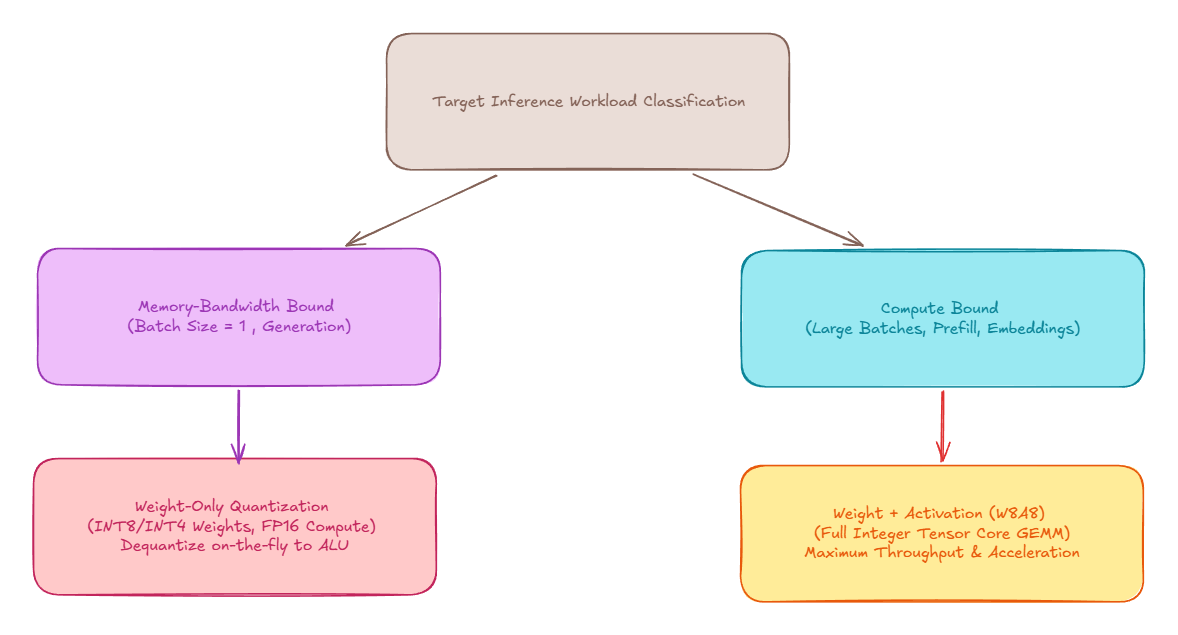
Workload Classification
- Memory-bandwidth bound, so quantize weights only. Autoregressive decoding at small batch sizes spends its time moving weights from VRAM into SRAM, not doing arithmetic. Quantize the weights, keep activations in FP16/BF16, and let the kernel dequantize on the fly just before the multiply. What you win is bytes moved per token.
- Compute bound, so quantize weights and activations (W8A8). Prefill, dense embedding encoders, vision backbones, and high-concurrency batched serving spend their time in matrix arithmetic. Quantizing both sides lets you issue real integer GEMMs on Tensor Cores. What you win is arithmetic throughput.
Getting this backwards is the most common failure we see. A team applies W8A8 to a batch-size-1 decode workload, absorbs the accuracy risk of activation quantization, and gains almost nothing, because the workload was never compute bound to begin with.
Symmetric vs. Asymmetric Formats
- Symmetric INT8 maps values symmetrically around zero into , with float zero landing exactly on integer
0. No zero-point term survives into the GEMM, which is why the vendor fast paths assume it. - Asymmetric INT8 carries an explicit zero-point offset alongside the scale . It preserves precision better on skewed distributions such as post-ReLU or post-GELU activations, at the cost of correction terms in the matrix multiply. Those terms are free if the backend fuses them and expensive if it does not, which is exactly what Step 5 exists to verify.
Step 2: Calibrate Empirically and Test for Range Stability
For W8A8 static quantization, activation ranges cannot be derived from the weights. They have to be observed by pushing real inputs through the model and recording what comes out.

What Actually Matters in Calibration
- Use your own data, not a public corpus. Calibrating on WikiText or C4 when production serves structured JSON, domain-specific code, or noisy user queries sets your activation scales to the wrong distribution and clips the features you actually care about.
- Stratify, then converge. Do not pick a number. Start with 128-512 representative production sequences spread across prompt lengths and domain strata. Then keep adding until the observed activation ranges and the resulting per-layer scale factors stop moving. Convergence is the stopping criterion; the sample count is simply whatever number produced it. A fixed “512 samples” rule is a guess that happens to be right sometimes.
- Clip deliberately. MinMax scaling hands your entire dynamic range to the single largest outlier in the calibration set. Use KL-divergence (entropy) calibration or percentile clipping in the 99.9-99.99% band so that one transient spike cannot flatten precision for every normal value in the tensor.
Step 3: Handle Sensitivity and Outliers (SmoothQuant vs. AWQ/GPTQ)
Transformers reliably develop activation outlier channels: specific hidden dimensions whose magnitudes run to above their neighbours. Per-tensor activation quantization stretches the scale to cover them and destroys the precision of the remaining 99% of channels.
The two families of fix solve genuinely different problems, and they are routinely conflated.
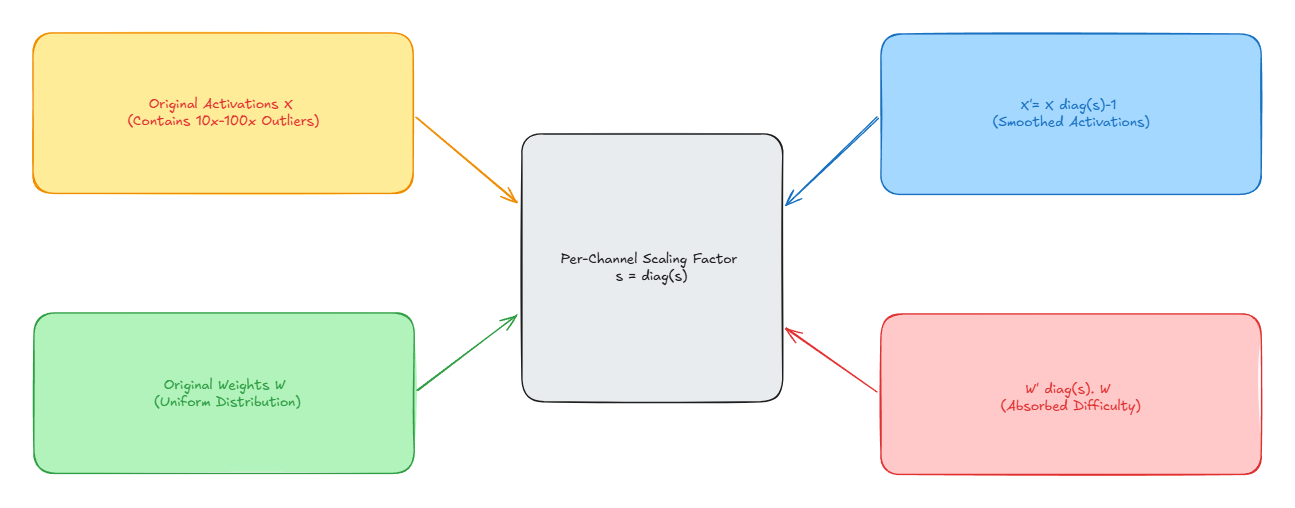
- SmoothQuant, for W8A8 integer GEMM. Migrates quantization difficulty out of the activations and into the weights using a per-channel scale : Divide the outlier activation channels, multiply the matching weight columns, and the product is mathematically unchanged. Both tensors become easy to quantize, and you get a genuine integer GEMM. Reach for this when Step 1 said compute bound.
- AWQ and GPTQ, for weight-only quantization. Both identify the small fraction of weight channels that matter most, AWQ from activation statistics and GPTQ from second-order Hessian information, then protect those channels while compressing the rest to INT8 or INT4. Activations stay in FP16/BF16. Neither method quantizes activations, and neither gives you a W8A8 integer GEMM. Reach for these when Step 1 said memory-bandwidth bound.
Choosing from the wrong column is not a tuning mistake, it is a category error. AWQ will not make a compute-bound prefill faster, and SmoothQuant will not help a batch-size-1 decode loop that is starved on memory bandwidth.
Step 4: Benchmark Application-Specific Quality and Drift
Global perplexity is a weak gate. A model can hold its aggregate score and still fall apart on the one task that justifies the deployment.
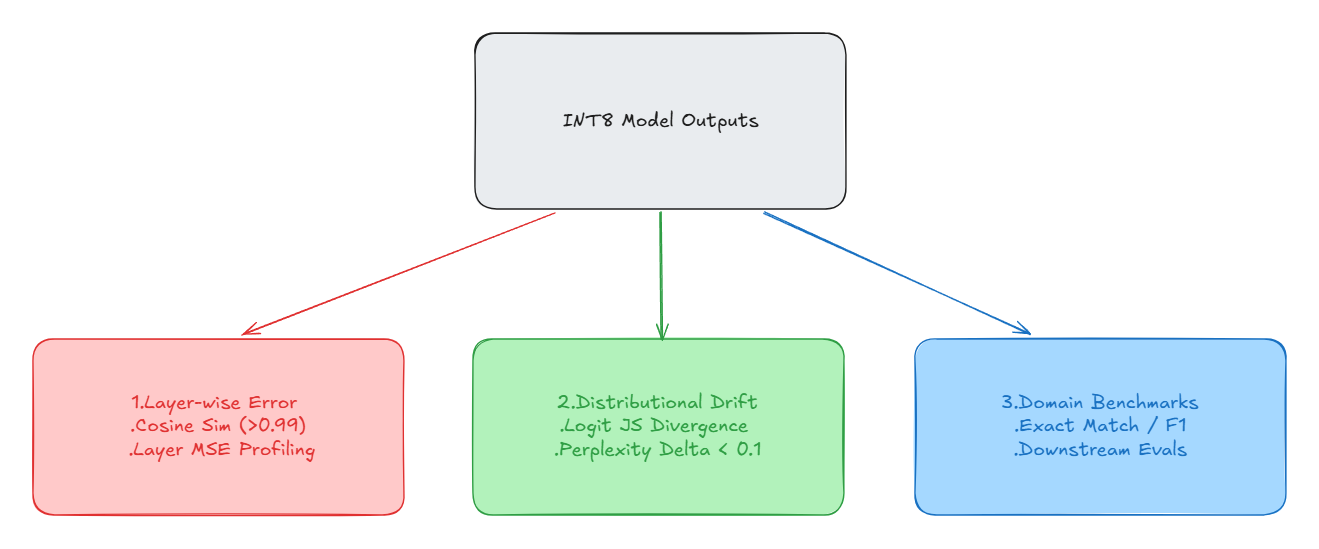
- Layer-wise error profiling. Track mean squared error and cosine similarity between FP16 and INT8 outputs layer by layer. A sharp drop in cosine similarity localises the damage to a specific layer, and that localisation is usually the fix.
- Logit and probability drift. Measure Jensen-Shannon divergence between the FP16 and INT8 output distributions across a validation set. Aggregate accuracy can hold steady while the distribution shifts underneath it.
- Application SLA gates. Set pass/fail thresholds from business impact, such as exact-match on extraction, compile rate on generated code, or ranking agreement, rather than from a leaderboard metric. The threshold should be a number somebody would defend in a review.
Step 5: Verify Kernel Execution and Measure Real Gains
This is the step teams skip, and it catches the most embarrassing class of failure. A quantized model running on FP16 kernels is slower than the baseline it replaced: you have paid the accuracy cost and added dequantization overhead in exchange for nothing.
The Kernel and Performance Gate
- Confirm which kernels dispatched. Read the engine build logs from TensorRT, vLLM, or TorchAO and verify that INT8 Tensor Core kernels were selected for every GEMM you targeted. Look specifically for silent Q/DQ backend fallbacks and un-fused graph breaks. “The build succeeded” is not the same claim as “the fast path is running.”
- Benchmark under realistic load. p50, p95, and p99 latency at production concurrency, not single-request timings against an idle GPU.
- Track serving economics. For autoregressive models: time-to-first-token (TTFT), time-per-output-token (TPOT), peak VRAM footprint, and cost per million tokens. TTFT and TPOT move independently, so quantization that speeds up prefill can leave decode entirely untouched.
If the numbers do not move, return to Step 1. Something about the pairing of engine and workload is wrong, and no amount of recalibration will fix it.
Step 6: Ship Safety Nets and Watch the Telemetry
Offline calibration cannot anticipate everything production will send you.
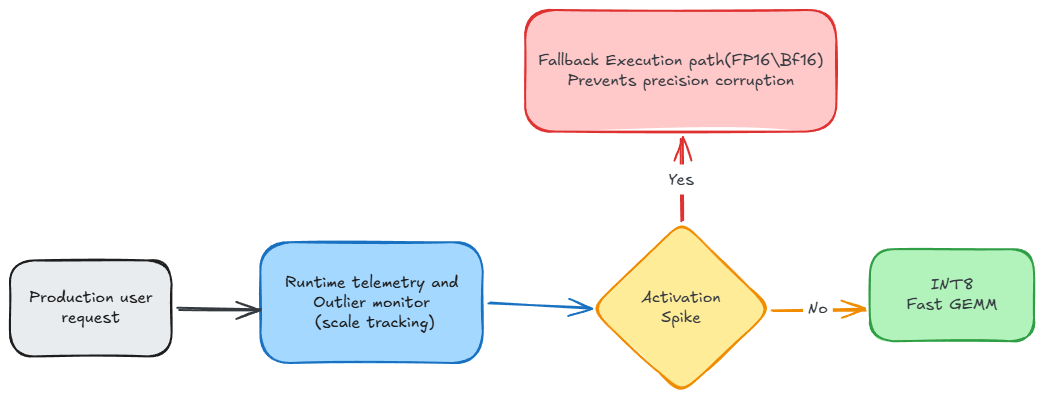
- Static hybrid precision, the primary defense. When profiling shows specific layers are sensitive, and the usual suspects are embedding projections, attention output projections, and the final LM head, keep those in FP16/BF16 and run the bulk of the transformer in INT8. It is deterministic, requires no runtime machinery, and resolves most of the problem before it reaches production.
- Canary and shadow deployment. Route 1-5% of live traffic to the INT8 model alongside the FP16 baseline and compare output agreement on real inputs before committing to a full rollout.
- Dynamic fallback, optional and not free. Routing individual requests to an FP16 path when runtime activations spike is a legitimate pattern, but it bills you for it: both models resident in VRAM, a spike detector that needs validating (false positives quietly erase the throughput gains you bought), and a latency budget that has to absorb the switch. It also complicates streaming responses mid-generation. Reach for it only after static hybrid precision has failed.
Pre-Deployment Verification Checklist
Before issuing deployment approval for an INT8 post-training quantized model, verify that every item on this checklist is marked complete:
| Step | Verification Milestone | Passed? |
|---|---|---|
| 1. Target Mapping | Classified the workload (compute-bound W8A8 vs. memory-bound weight-only) and confirmed the target engine supports accelerated INT8 Tensor Core dispatch. | [ ] |
| 2. Empirical Calibration | Calibrated on representative production data, expanding the sample set until per-layer scale factors and activation ranges converged. | [ ] |
| 3. Outlier Handling | Applied SmoothQuant for W8A8 integer GEMM, or AWQ/GPTQ for salient-channel protection in weight-only mode. | [ ] |
| 4. Quality Verification | Validated layer-wise cosine similarity, logit JS-divergence, and downstream domain task accuracy against a defined SLA tolerance. | [ ] |
| 5. Kernel & Perf Gate | Verified zero silent Q/DQ fallbacks in the engine logs and confirmed measurable gains in p95/p99 latency, TTFT, and TPOT. | [ ] |
| 6. Safety Nets | Applied static hybrid precision to sensitive layers and executed a canary rollout with live telemetry monitoring. | [ ] |
References & Further Reading
- SmoothQuant Paper: SmoothQuant: Accurate and Efficient Post-Training Quantization for Large Language Models (Xiao et al., 2022), mathematical formulation of activation outlier migration for W8A8 integer GEMM.
- LLM.int8() Paper: LLM.int8(): 8-bit Matrix Multiplication for Transformers at Scale (Dettmers et al., 2022), analysis of emergent activation outliers in large-scale transformer models.
- AWQ Paper: AWQ: Activation-aware Weight Quantization for LLM Compression and Acceleration (Lin et al., 2023), protection of salient weight channels guided by activation distributions for weight-only quantization.
- GPTQ Paper: GPTQ: Accurate Post-Training Quantization for Generative Pre-trained Transformers (Frantar et al., 2022), one-shot layer-wise weight quantization using second-order Hessian updates.
- NVIDIA TensorRT Developer Guide: NVIDIA TensorRT Quantization Schemes, technical reference on INT8 and FP8 hardware execution schemes.
- PyTorch Architecture Optimization: Welcome to the torchao Documentation, PyTorch-native quantization, PT2E export flows, and serving optimizations.
Keep the engineering going.
Book a call with our engineering leads to pressure-test your own model-shipping workflow.
Book a consultation